The problem after every major hosting advisory: Administrators apply updates, assume the job is done, and move on. Kernel fixes don’t activate until a reboot. cPanel update tiers get pinned. EasyApache packages stall behind repository epoch conflicts. The server looks fine, and isn’t.
This tool exists to close that gap.
WebCare360 has published two detailed technical advisories covering the May 2026 Linux hosting vulnerabilities:
- Linux Hosting Security Advisory: cPanel, Apache, OpenSSH, Kernel & CloudLinux – covers CVE-2026-41940, CVE-2026-31431, CVE-2026-23918, and CVE-2026-35414 with full patch commands.
- New cPanel & Linux Kernel Security Advisory: CVE-2026-29201, CVE-2026-29202, CVE-2026-29203 and Dirty Frag – covers the May 8 TSR batch and Dirty Frag kernel mitigation in depth.
This post is not another advisory. It is the practical follow-up for administrators who have already read those posts and now need to answer one question from the command line:
“Is my server actually patched ; or do I still need to take action?”
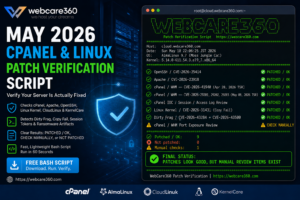
What the WebCare360 patch-verification helper does
The tool is a single Bash script you run as root. It checks the live state of your server against the May 2026 fixed baselines and reports back in three clear statuses:
- ✅ PATCHED / OK — the checked item meets the expected fixed baseline or mitigation condition.
- ⚠️ CHECK MANUALLY — something requires administrator review. This typically occurs when package backports, cPanel update tiers, or KernelCare livepatch status make automatic verification uncertain.
- ❌ NOT PATCHED — the item is below the expected baseline or a problem requires action.
When the script finishes, it prints a summary count and a single final status line, then exits with a machine-readable code:
0 = all checked items appear OK
1 = one or more failures detected
2 = warnings or manual review items exist
Who this tool is built for
The script is designed for administrators managing:
- cPanel / WHM servers on EasyApache4
- AlmaLinux 8 and 9 hosting nodes
- CloudLinux 8 and 9 environments
- RHEL-compatible VPS and dedicated servers
- KernelCare-enabled systems
- Reseller, shared hosting, and multi-tenant nodes
For teams running production workloads on unmanaged or self-managed infrastructure, this type of check is especially useful after emergency advisories. If you are deploying or maintaining your own hosting environment, WebCare360 also provides offshore VPS Servers і виділені сервери for administrators who need flexible server-level control.
What the tool checks
The script covers every area flagged in the May 2026 hosting advisories.
OpenSSH – CVE-2026-35414 Queries the installed openssh RPM version against the expected fixed package baseline for EL8 environments and reports the running sshd version alongside.
Apache HTTP Server – CVE-2026-23918 Checks the Apache version against the 2.4.67 fixed baseline. If the server is running a vulnerable version, the tool goes further: it checks whether mod_http2 is actually loaded. On CloudLinux 8 systems where the patched EasyApache package has not yet landed due to the repository epoch conflict, an unloaded mod_http2 is flagged as a compensating control rather than a hard failure. The tool also checks dnf for available patched builds and reports if one has arrived.
cPanel / WHM – CVE-2026-41940 (April 28 TSR) Checks the installed cPanel version against the per-branch fixed builds for the CVSS 9.8 authentication bypass (11.132.0.29 / 11.134.0.20 / 11.136.0.5). The configured update tier is reported alongside so you can spot a pinned tier before it causes confusion.
cPanel / WHM – CVE-2026-29201, CVE-2026-29202, CVE-2026-29203 (May 8 TSR) Checks the upcp log modification timestamp against the May 8 patch window. Because the per-branch fixed builds for TSR-2026-0002 require verification against the official cPanel release notes, the tool flags this section with links to confirm the exact build rather than making an assertion it cannot guarantee.
Linux Kernel – CVE-2026-31431 (Copy Fail) Checks uname -r against the fixed kernel baselines for EL8 (4.18.0-553.123.2.el8_10) and EL9 (5.14.0-611.54.3.el9_7). If a newer kernel package is installed but the server has not rebooted into it, the tool flags this explicitly — a common post-patching blind spot.
Dirty Frag – CVE-2026-43284 and CVE-2026-43500 This is the most layered check in the script. The tool evaluates multiple states in combination: whether the kernel is patched, whether KernelCare livepatch is active with a non-zero patch level, whether the vulnerable modules (esp4, esp6, rxrpc, xfrm_user, ipcomp4, ipcomp6) are currently loaded, and whether the /etc/modprobe.d/dirtyfrag.conf blacklist is complete. It reports the correct status for each combination rather than collapsing everything into a single pass/fail.
Session and ransomware artifact review The tool checks /var/cpanel/sessions/raw for token entries and scans /home, /root, і /var/www за .sorry ransomware artifacts — a known indicator of CVE-2026-41940 exploitation. If .sorry files are found, the tool reports the file paths and flags that patching alone is not sufficient.
cPanel port exposure Reports whether cPanel, WHM, and Webmail ports (2082, 2083, 2086, 2087, 2095, 2096) are publicly accessible on the host.
Recommended remediation commands The final section prints the relevant update commands for your environment so you can act immediately without switching windows.
Download and run the tool
Download the script:
⬇ Download WebCare360 Patch Verification Helper
Or save the script below as patch-verify.sh.
Run as root:
chmod +x patch-verify.sh
./patch-verify.sh
Example output
The terminal output is colour-coded and structured by section. Here is a representative summary block:
✅ PATCHED / OK       OpenSSH is at or above the expected fixed package level.
❌ NOT PATCHED        Running kernel is below the fixed level for CVE-2026-31431 and CVE-2026-43284 (EL8).
⚠️  CHECK MANUALLY    upcp log updated — verify exact build vs TSR-2026-0002 at news.cpanel.com
✅ PATCHED / OK       No .sorry ransomware artifacts found.
⚠️  CHECK MANUALLY    cPanel/WHM/Webmail ports are publicly accessible on this host.

✅ Patched / OK:       4
❌ Not patched:        1
⚠️  Manual checks:     2

FINAL STATUS: ONE OR MORE ITEMS ARE NOT PATCHED
What to do if the tool reports failures
If the script exits with code 1, the detailed advisory posts cover full remediation:
- cPanel / WHM failures → cPanel, Apache, OpenSSH, Kernel & CloudLinux advisory
- Kernel or Dirty Frag failures → CVE-2026-29201, 29202, 29203 and Dirty Frag advisory
If the tool finds
.sorryfiles or unexpected session tokens: do not stop at patching. Those are post-exploitation indicators. Review authorized_keys, UID 0 accounts, cron jobs, sudoers entries, and recent modifications under/home,/root,/tmp,/var/tmp, і/dev/shm. Patching closes the door — it does not evict an attacker who is already inside.
Important disclaimer
This script is a patch-verification helper, not a complete vulnerability scanner, forensic tool, or security guarantee.
Results depend on operating system, vendor repositories, cPanel version branch, EasyApache package source, running kernel version, KernelCare livepatch status, and local server configuration.
Always verify final patch status against official vendor advisories, cPanel release notes, and your operating system package manager.
WebCare360 did not discover these vulnerabilities. This tool is published to support faster patch verification and better security hygiene across the hosting community.